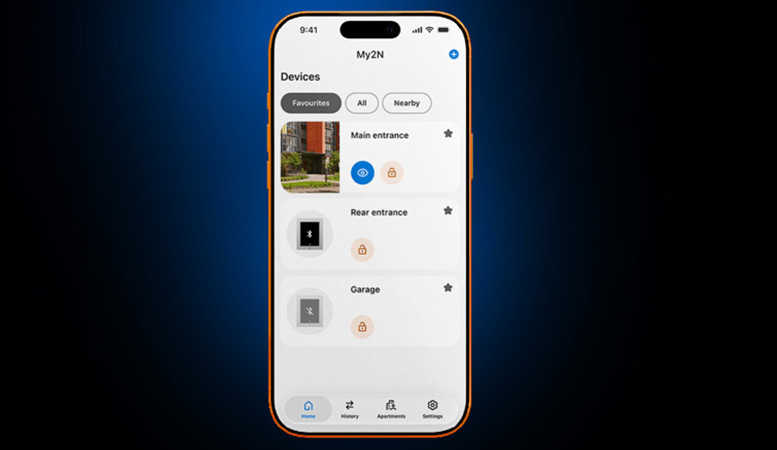
With the latest update of the My2N App, intercom calls, mobile access and door control are brought together in one clear dashboard. For 2N installers and resellers, this means less explanation, less variation and a simpler handover.
One dashboard instead of five home screens
Over the years, more and more features have been added to the My2N App. Depending on the active services, such as cloud calling or mobile access, a user used to see one of five different home screens. This kept the services neatly separated, but it also created unnecessary variation, both for end users and for building management teams.
2N has now brought all configurations together in one consistent dashboard. Whether a user only uses the app to answer intercom calls and let visitors in, or uses their smartphone to unlock doors, from the garage to the roof terrace, the app looks the same and works the same way for everyone.
Designed for the daily walk through the building
Nobody wants to scroll through a long list of doors while standing at a turnstile. The new dashboard matches the way people actually move through a building:
- Pinned favorites: users mark their regular doors as favorites, for example the parking access, the lobby elevator and the office space an employee passes every morning. Anyone using Tap in App activates their mobile credentials instantly, without searching.
- Smart filters: with a quick toggle at the top, users switch between favorites, all doors they have access to, and nearby devices detected via Bluetooth.
- Intercom and doors side by side: speaking to a delivery person at the entrance gate and unlocking the parcel room now happens in exactly the same place.
No extra work for you or your customer
The new dashboard is enabled by default for everyone. You therefore don’t need to change any settings, modify any backend permissions or purchase any new licenses. As soon as users have updated the My2N App on their phone, the new screen is ready to use. No manual configuration is required.
What does this mean for installers and resellers?
- Simpler handover and instruction: one interface means one explanation, regardless of which services are activated in a project.
- Fewer support requests: a consistent app reduces the risk of confusion among residents and employees.
- No additional work: the update requires no configuration, no changes to existing projects and no extra licenses.
Missed recent updates?
The dashboard is just the latest step in making the My2N App more practical. These are other recent features you can offer your customers:
- Apartment Manager: users with this role can create and manage users and credentials within their own apartment.
- Delivery access: residents generate a time-limited PIN code or QR code in the app. They can add it to delivery notes in advance or share it on the day of delivery.
- Camera snapshot settings: administrators can disable the storage of visitor photos in the My2N App per location via the My2N Management Platform, in order to comply with local privacy regulations.
- Companion app for Apple Watch: residents and employees unlock doors with a single tap from their wrist, thanks to handy watch face complications.
- Free cloud calling for single-family homes: new residential projects get free cloud calling from a 2N IP intercom to up to 4 mobile devices, with mobile video access and no subscription costs.
Want to know more about 2N?
As an official distributor of 2N, BusinessCom is happy to advise you on the possibilities of the My2N App and the 2N product range for your projects. Contact the BusinessCom team for more information or personal advice.